A duplicate photo finder that knows the difference
Two photos can be the same file twice, or two frames of the same moment. Those are different problems and they need different answers. DuoBolt proves exact copies byte-for-byte, groups look-alikes by what the picture shows, and never reports one as the other.
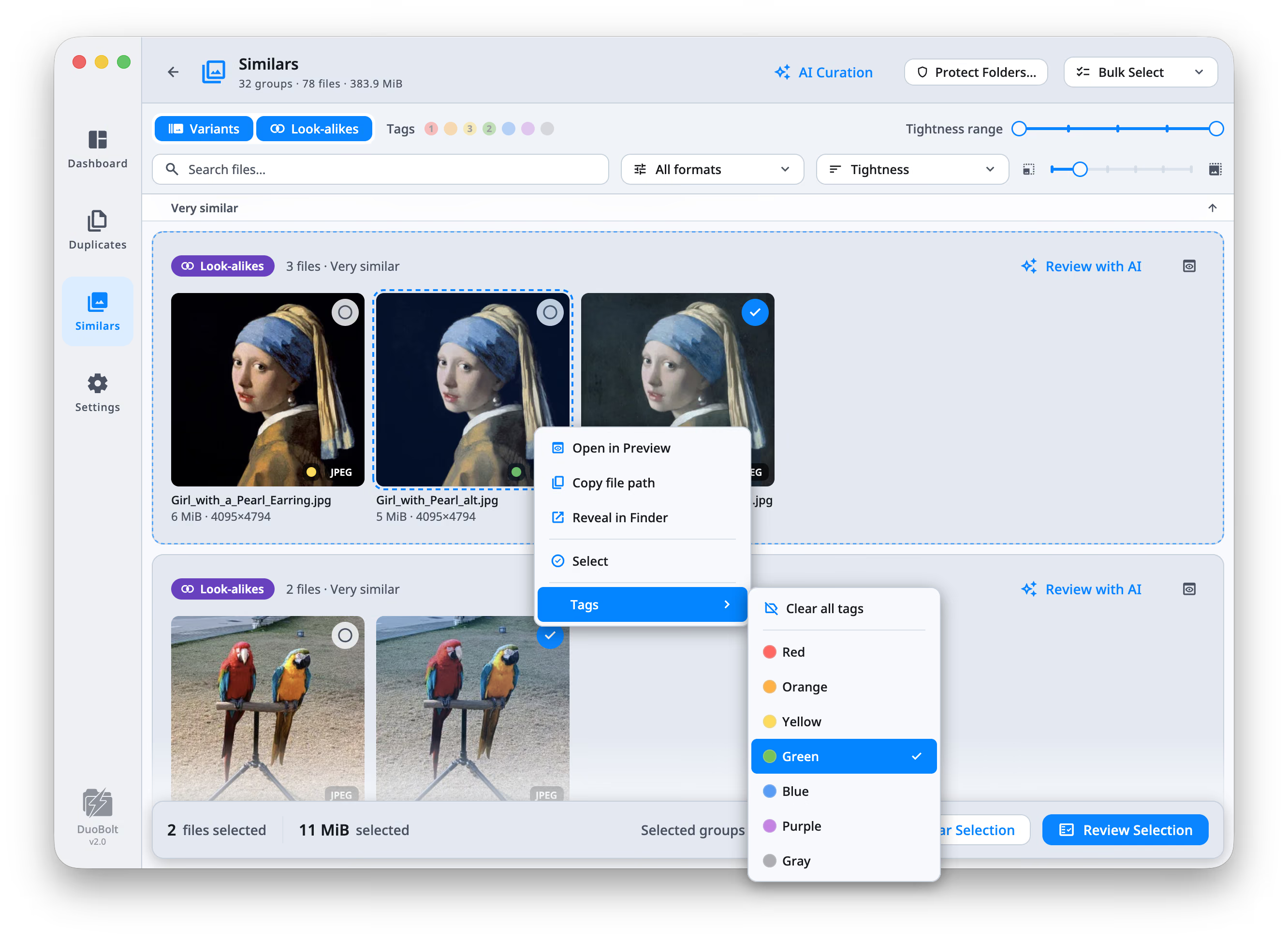
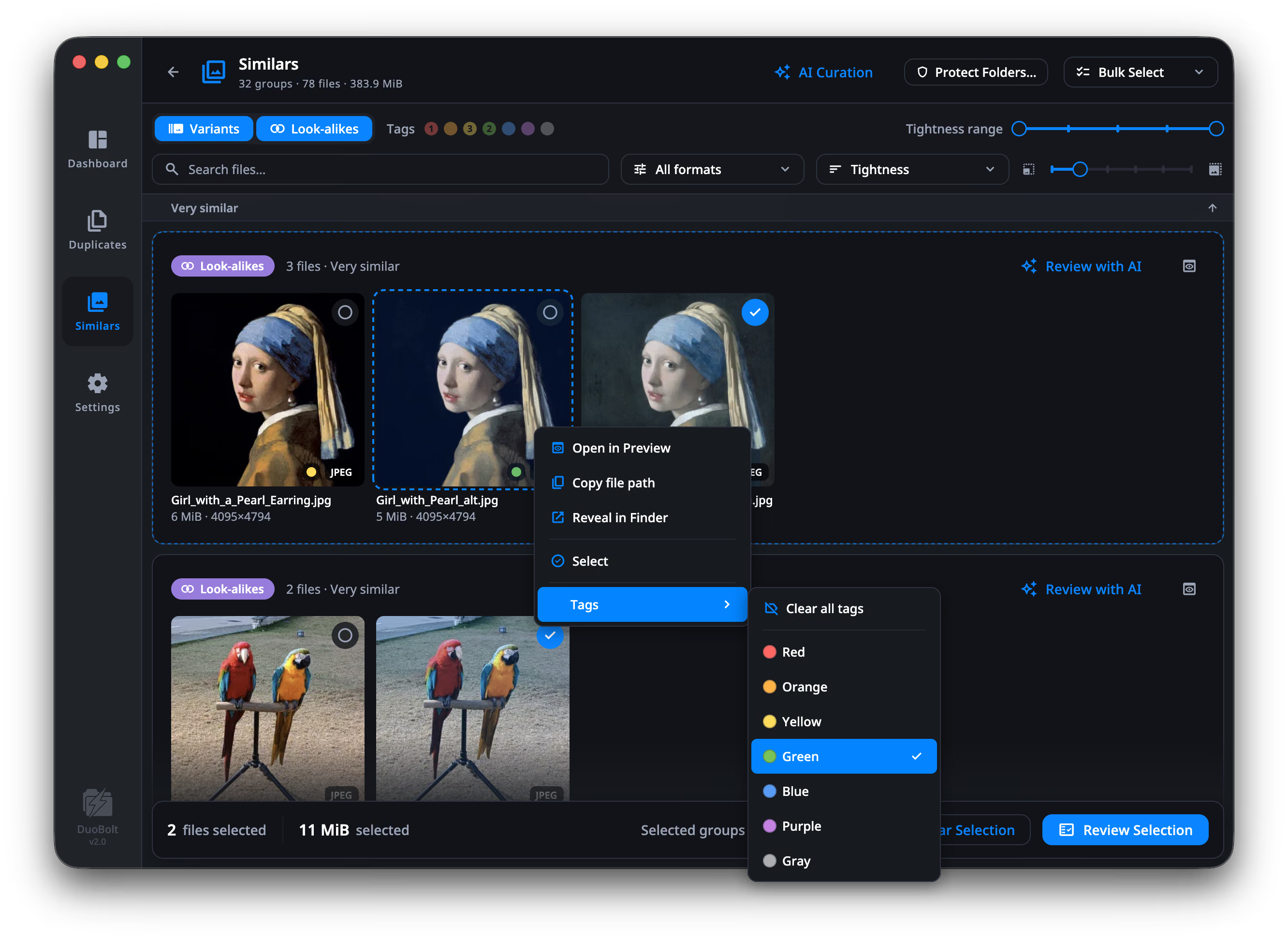
Similar is a judgment. Identical is not.
A photo deduper has to decide how strict to be. Perceptual matching alone can call two different pictures a match and let you delete a keeper. Exact matching alone misses the forty-frame burst you wanted gone. DuoBolt runs both and labels which is which : an exact copy is a proven BLAKE3 match, a look-alike is a ranked group you review yourself — and the tightness of that grouping is a control you can see and move.
Exact copies, proven
The same photo saved twice is found by fully hashing both files with BLAKE3. Identical means byte-for-byte identical — not a similar name, not a matching size, not a thumbnail that looks close. Inside a group, copies with the same bytes fold into one stacked tile, so the grid shows each picture once. In a Photos library on a Mac, that is the photo you imported twice — and each copy says which import it came from.
Look-alikes and variants, kept apart
Forty frames of the same moment are one kind of problem. A RAW file and the JPEG you exported from it are another. DuoBolt labels each group as Look-alikes or Variants, because what you do with them is not the same.
You set how close counts
A Tightness range from Identical through Virtually identical, Very similar and Similar to Loosely similar. Move it and the groups re-form. Nothing is hidden behind a threshold you cannot see or change.
A compare curtain for two copies
Deciding between a RAW and its export, or a burst frame and the one beside it, means seeing both at once. The preview puts them under a curtain you wipe across — same fit, same zoom, same position — and reads the light in each: a histogram over the picture, and the two curves laid over each other when you want the difference rather than the shape.
A keep rule, applied to every group
Write down which copy you want kept — more pixels, the RAW, the one that still has its EXIF, the copy under a folder you name, the frame shot at the lowest ISO — and DuoBolt applies that order to every group at once. The first rule with an opinion decides; anything it cannot tell apart is left for you.
RAW from eleven makers, read directly
RAW from Canon, Nikon, Sony, Fujifilm, Olympus, Panasonic, Leica, Pentax, Samsung, Sigma and Adobe DNG — the originals, not just the JPEGs you exported. HEIC and AVIF too.
How look-alike grouping works
Four stages between pointing DuoBolt at a folder — or, on a Mac, at the Photos library — and seeing a group you can act on.
- Step
Read the picture
Every image is decoded and reduced to a perceptual hash — a compact fingerprint of what the picture looks like. File names, folders and dates play no part in it.
- Step
Group by distance
Fingerprints are compared and clustered, with a bound on how far apart the two furthest members of a group may be. That bound is what stops a chain of slightly-similar photos from sliding into one enormous group.
- Step
Label what kind it is
Groups shot in one burst or retaken across a session are Look-alikes. Groups that are one shot stored more than once — RAW plus JPEG, an iCloud trio, a downscaled export — are Variants.
- Step
You review, then you choose
Every group is laid out with paths, sizes and previews. Move to Trash, move to an Archive folder, copy somewhere else, or delete outright — and nothing moves until you say so.
Duplicate photo finder FAQ
- What counts as a duplicate photo?
- Two different things, and DuoBolt keeps them separate. An exact copy is byte-for-byte identical, proven by a full BLAKE3 hash. A look-alike is a different file that shows the same thing — a burst frame, a retake, a re-save, or the same shot stored in another format or size. DuoBolt labels which of the two you are looking at, and never reports one as the other. In a Photos library on a Mac, the same photo imported more than once is an exact copy, and each copy says which import it came from. How photo matching works →
- Can I compare two copies of the same photo before choosing?
- Yes. Open either one in the preview and press C: both appear in the same frame with a divider you drag across, at the same fit, zoom and position, so a difference in sharpness or exposure shows up where memory fails. H adds a histogram over the picture — R, G and B, any single channel, or luminance, with the shares pinned at pure black and pure white — and while comparing it can lay the other copy's curve over this one's. A RAW is developed for this, not read from the small JPEG the camera embedded in it. Comparing two photos →
- Can I tell it which copy to keep, once, instead of group by group?
- Yes. Settings holds an ordered list of keep rules per finder — keep the copy with more pixels, keep the RAW, keep the one that still has its EXIF, keep the copy inside or outside a folder you name, keep where ISO is the lowest or the shutter the fastest. DuoBolt reads it top to bottom, the first rule with an opinion decides, and Keep by my rules runs it over every group at once. Nothing is selected on a guess: what no rule can tell apart is left alone. Keep rules →
- I imported the same photos into Photos twice. Can it clean that up?
- Yes, on a Mac. Choose Photos instead of folders on the Similars setup and DuoBolt reads the library directly — no export. Every copy of a re-imported photo is labeled with its import (1st import, 2nd import), a Photos filter keeps just those groups, and Keep First Import selects the later copies in every group at once. What you remove goes to Photos' Recently Deleted, where Photos keeps it for 30 days. The Photos library →
- Will it delete photos on its own?
- No. DuoBolt marks and groups; you decide. Every removal goes through a review screen that shows full paths, sizes and previews first, and you choose between moving to Trash, moving to an Archive folder, copying elsewhere, or deleting outright. Only the last is final, and it says so. A photo in the Photos library goes to Photos' Recently Deleted, where Photos keeps it for 30 days.
- Does it work on RAW files?
- Yes — the RAW files themselves, rather than only the JPEGs you exported from them. Canon CR2 and CR3, Nikon NEF and NRW, Sony ARW, Fujifilm RAF, Olympus ORF, Panasonic RW2, Leica RWL, Pentax PEF, Samsung SRW, Sigma X3F and Adobe DNG are all read on both macOS and Windows. How it reads them: grouping works from the full-color preview your camera writes inside the RAW, not from the sensor data, which is what keeps it fast and free of a RAW-converter dependency. Open a photo full screen and that one is developed properly. If you shoot RAW+JPEG, see RAW + JPEG duplicates for how a pair is settled. RAW + JPEG: keeping the one you meant →
- How do I tell two near-identical copies apart?
- Open one and press C. Both copies appear in the same frame at the same fit, zoom and position, with a line you wipe between them, and H draws a histogram over the picture so the exposure is measured rather than guessed at. In the grid, the inspector beside it (⌥⌘I) shows the photo under the cursor: its histogram, its camera, lens, exposure and where it was taken, and how it differs from another copy in the group in pixels, size and date taken. Comparing two copies of one photograph →
- What about HEIC photos from an iPhone?
- HEIC and AVIF are read on both platforms. On macOS it works out of the box. On Windows the system needs two free Microsoft Store add-ons — HEIF Image Extension and AV1 Video Extension — and without them those files are skipped silently, so an iPhone library will look like it has nothing to group.
- Do my photos get uploaded anywhere?
- No. Every stage runs on your machine: decoding, fingerprinting, grouping and the AI that ranks a group. There is no account to create and no library to upload. The only network calls DuoBolt makes are the license check and the update check.
- How much of it is free?
- Every exact duplicate it finds, and the first 8 similar-photo groups — whole, not blurred and not counted. Those 8 groups behave exactly like the rest, AI ranking included. Pro removes the cap, and every download starts with 7 days of it.
Keep exploring
Exact duplicate file finder
The other engine: byte-for-byte BLAKE3 matching, for when “similar” is not good enough and only identical will do.
Read moreAI photo culling
Once the frames are grouped, which one do you keep? DuoBolt ranks each group and names what it measured — and never deletes on its own.
Read moreThe app, screen by screen
Scanning, results, review and history — what each part of DuoBolt does, with screenshots.
Read moreFree, Standard and Pro
What the free tier includes, what each license unlocks, and the 7-day Pro trial that comes with every download.
Read moreHow photos are matched
Perceptual hashing, the similarity threshold, the five tightness bands, and why a group is built from mutual pairs rather than a chain.
Read more