A free duplicate file finder with nothing blurred out
“Free” often means free to scan. You point it at a drive, it works for twenty minutes, and then the results arrive blurred, or replaced by a number and a price. DuoBolt shows you every duplicate it finds, in full, for nothing — and tells you upfront where the free tier does stop.
Where Free's limit is
On duplicate files, find as much as you like, see all of it, and act on up to 25 files and 500 MiB at a time . That is enough to check that it works on your own files before you pay for anything. A badly duplicated drive takes a few passes. Look-alike photos run on a different engine and that one does have a free ceiling — the first 8 groups of a scan — but those 8 are whole rather than blurred, with the AI ranking working inside them exactly as it would with a license.
Every duplicate file, in full
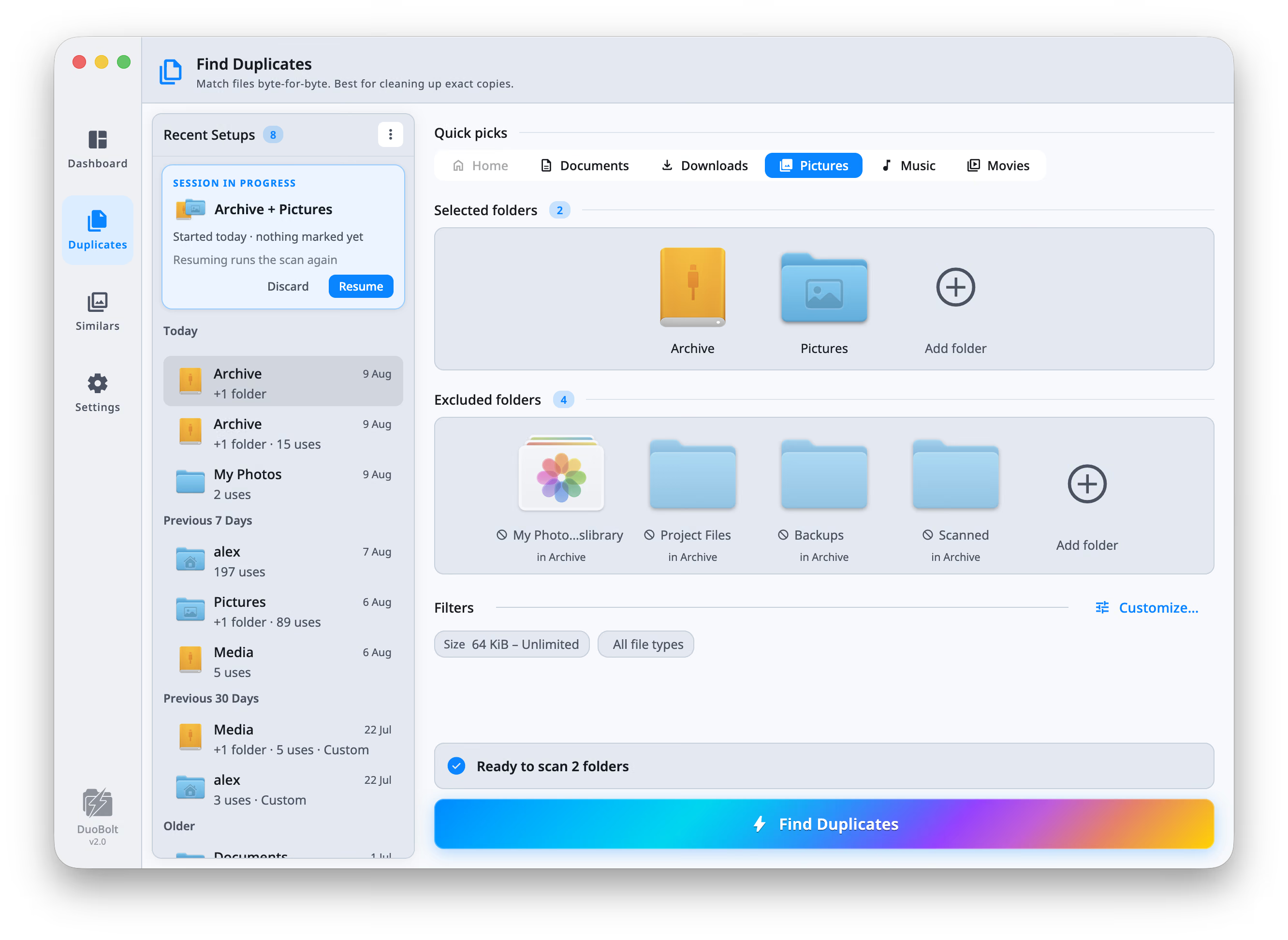
No blurred wall, no “1,234 duplicates found — upgrade to see them”. The free scan shows every byte-for-byte duplicate group it finds, with real names, real paths and real sizes, on as many files as you point it at.
Free does not mean careless
The free scan runs the same engine the paid one does: every candidate fully hashed with BLAKE3, byte-for-byte, with no name or size shortcuts.
No account, no ads, no bundle
Nothing to sign up for, nothing to log into, no toolbar in the installer and no upsell interrupting a scan. Download it, point it at a folder, done.
The one limit
Free acts on up to 25 files, and up to 500 MiB, per operation: a removal, a replacement with clones, or a sync. Finding and comparing are unlimited; clearing a very large mess just takes more passes. A license lifts that, and it is a one-time purchase, not a subscription.
Cleaning up for free, start to finish
Four steps, none of which ask for an email address.
- Step
Download and open it
macOS and Windows, both native. No account, no email, no license key to paste before you can see whether it works.
- Step
Point it at a folder
A drive, a Downloads folder, a NAS share. Exclude anything you want left alone, set a size floor so tiny files never enter the scan, and start it.
- Step
See the whole result
Every duplicate group, sorted by what it would free. Preview the files, check the paths, and untick anything you want to keep. This is the step the other free tools charge for.
- Step
Clear it in passes
Up to 25 files and 500 MiB at a time, through the same review screen a paid license uses: Trash, Archive, Copy elsewhere, delete outright or, on a Mac, replace with clones. Repeat until the folder is clean, or buy a license and do it in one.
Free duplicate file finder FAQ
- Is it actually free, or a trial that stops working?
- Actually free, with no expiry. Scanning and reviewing are unlimited and every result is shown in full. The only limit is on what one operation carries out: up to 25 files and up to 500 MiB, whether it removes files, replaces them with clones or syncs two folders. Nothing switches off after a fortnight and nothing you have already cleaned comes back.
- What is the catch?
- The removal cap, and that is the whole of it. Clearing a badly duplicated drive takes several passes instead of one. If that is tedious enough to be worth money, a license is a one-time $34.99 for two machines — and if it is not, keep using it free.
- Are there ads, or bundled software in the installer?
- No. There is no advertising anywhere in the app, nothing extra in the installer, and no account to create. The app makes two kinds of network call in its whole life: an update check, and a license check if you own a license.
- Does the free version delete anything on its own?
- No. Nothing moves until you confirm it on a review screen that shows full paths, sizes and previews, and you choose between moving to Trash, moving to an Archive folder, copying elsewhere, deleting outright, or, on a Mac's APFS volume, replacing each copy with a clone of the one you keep. Only deleting outright is final, and it says so.
- Is finding duplicate photos free too?
- Partly, and the difference is worth knowing. Duplicate files — including photo files that are byte-for-byte identical — are found and shown without any cap. Look-alike photos are a separate engine, and below Pro it shows the first 8 groups of a scan. Those 8 are whole rather than blurred: the AI ranking works inside them exactly as it does with a license.
- Is Sync Folders free too?
- Yes, with the same cap. Comparing two folders is unlimited, and every difference is shown. A sync then carries out up to 25 files and 500 MiB at a time, and what is left stays in the list for the next sync.
- What does paying actually change?
- Standard removes the per-operation cap, for removals and syncs alike. Pro adds every look-alike photo group and AI Curation on all of them. Both are one-time purchases covering two machines, with a 30-day refund and every 2.x update included — and every download starts with 7 days of Pro so you can see the whole thing before deciding.
Keep exploring
How the matching works
Why every candidate is fully hashed with BLAKE3, and why a duplicate finder that guesses is the dangerous kind.
Read moreDuplicate photo finder
The other engine: exact copies proven byte-for-byte, look-alikes grouped by what the picture shows.
Read moreDuplicates on a Synology or other NAS
The free scan works on a mounted share like any other folder. Nothing is installed on the NAS, and its snapshot folders are skipped.
Read moreFree, Standard and Pro
Exactly what each tier lifts, what a license costs, and what the 7-day Pro trial includes.
Read moreWhat each tier unlocks
The free operation cap in full, what Standard removes, what Pro adds, and what happens on the day the trial ends.
Read more