AI photo culling that shows its working
A wedding leaves you eight hundred frames and forty of them are the same moment. DuoBolt groups those frames, marks the best one, and tells you what it measured to get there — sharpness, exposure, whether the eyes are open. Then it stops.
Two worries about culling AI
That it will quietly bin a keeper, and that it needs your whole wedding on a server first. DuoBolt is built against both. It selects rather than deletes , and every selection is a comparison you can read and reverse in one click — the panel names the runner-up and the margin, not a confidence percentage. And the models are in the app, so a 900-frame shoot is analyzed on the drive it is sitting on, with no upload and no account.
It names what it measured
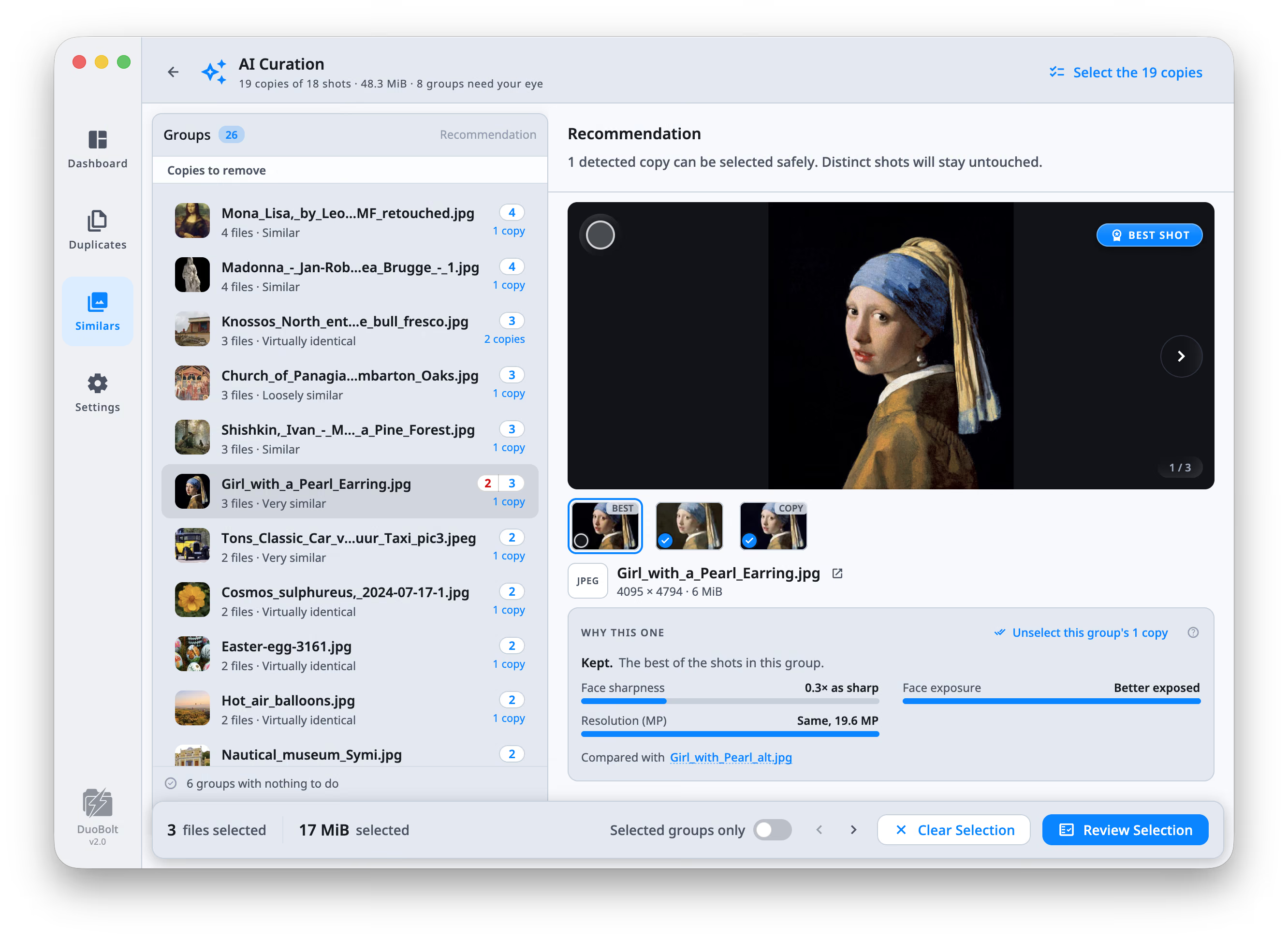
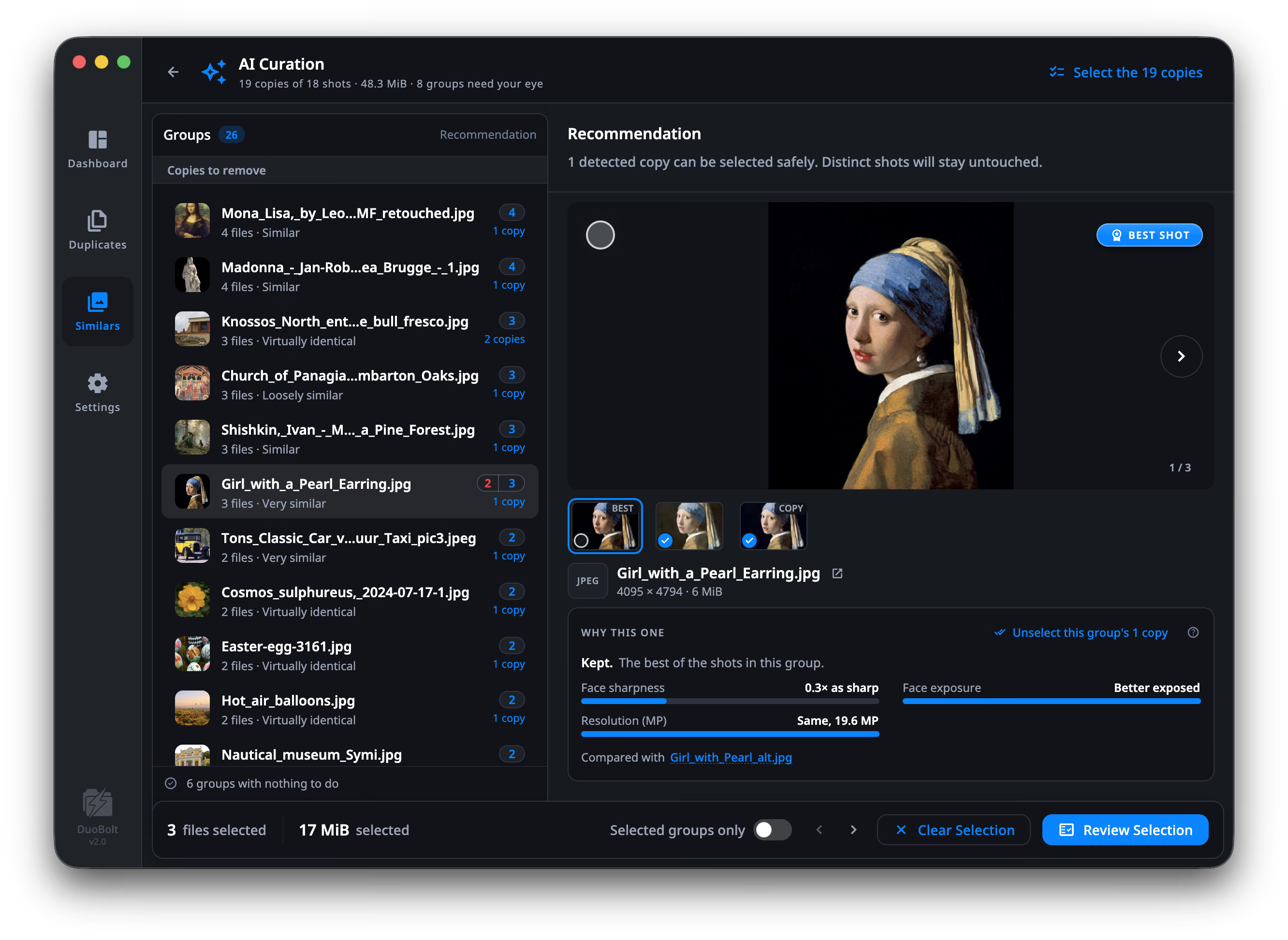
Sharpness, exposure, resolution and format fidelity on every group, plus an aesthetic score on the 1–10 scale photo panels use. Where DuoBolt finds faces, eyes open and smile join in — and the sharpness and exposure it reports become the face's, not the frame's.
Only the measures that mattered
A group lists the factors that actually separated its shots and stays quiet about the rest. Two frames at the same resolution do not get a resolution row just to fill the panel out.
When it is not sure, it says so
Groups it can separate become copies to remove. Groups where the shots are genuinely different go to Needs your eye instead of into a selection, and groups with nothing to do say so and get out of the way. Copies that are identical byte for byte are not scored at all: one is kept by rule, and the card names the rule.
The sweep only selects
The sweep selects; it does not act. Everything then goes through the same review screen the rest of DuoBolt uses — full paths, sizes and previews, and a choice between Trash, an Archive folder, a copy elsewhere, or deleting outright.
How a keeper gets chosen
Four stages between a folder of frames — or a Photos library, on a Mac — and a selection you can disagree with.
- Step
The frames become groups
Before anything is ranked, the shots of one moment are gathered — by what the picture shows, not by file name or timestamp. Bursts and retakes land together; a RAW and its exported JPEG land together separately.
- Step
One group is analyzed at a time
Models bundled with the app score each frame on your own machine. Nothing is queued to a server and there is no wait for an upload — the analysis runs at the speed of your CPU, and a group you have already reviewed stays scored.
- Step
A best shot, and the reason
One frame is marked best, and the panel compares it with the runner-up in plain terms. In the screenshot above, the kept shot is 1.2× sharper, slightly better exposed and the same 19.6 MP. The comparison always names the shot it was measured against.
- Step
You sweep, review, and decide
Select the detected copies across every analyzed group in one action, or work group by group and disagree wherever you like. Then the ordinary review screen, and nothing has moved until you say so.
AI photo culling FAQ
- Does DuoBolt delete photos automatically?
- No, and it cannot. The engine ranks and explains; the app renders and you decide. AI Curation selects the frames it believes are copies of a shot you are keeping — selecting is all it does. Removing anything means going through the review screen, which shows full paths, sizes and previews and offers Trash, Archive, Copy or permanent delete.
- Do my photos get uploaded for analysis?
- No. The models ship inside the app and run in-process on your machine. There is no account, no library upload and no queue. The only network calls DuoBolt makes are the license check and the update check.
- What does it actually measure?
- Sharpness, exposure, resolution in megapixels, format fidelity, and an aesthetic score on the 1–10 scale photo panels use. When faces are found it adds eyes open and smile, and measures sharpness and exposure on the face rather than the whole frame. Each group shows only the measures that actually separated its shots. The seven measures, with the scale each one uses →
- Does it work on RAW files?
- Yes — the RAW files themselves, so the originals get culled too instead of piling up behind the exports. Canon, Nikon, Sony, Fujifilm, Olympus, Panasonic, Leica, Pentax, Samsung, Sigma and Adobe DNG are all read on macOS and Windows. Worth knowing how: DuoBolt reads the full-color preview your camera writes inside the RAW rather than developing the sensor data itself, which is what keeps it fast and free of a RAW-converter dependency. That preview is what the thumbnails, the grouping and the measures see, so treat the result as a first pass over the take — it is not a check of critical focus at 100%. The full-screen preview and the histogram are the exception: they show the RAW as the system develops it, through ImageIO on macOS and WIC on Windows, and fall back to the embedded preview only when the system cannot develop that RAW.
- What if the shots in a group are genuinely different?
- Then it says so. Those groups go to Needs your eye rather than into a selection, and groups where every frame is distinct are reported as having nothing to do. A tool that always produces a winner eventually throws away a keeper. How a group is built in the first place →
- Can I check the ranking against the photos themselves?
- That is what the preview's compare curtain is for. The ranking names what it measured; the curtain puts the two frames in one place — same fit, same zoom, same position — so you can look at the sharpness it reported rather than take it. A histogram over the picture reads the exposure the same way, and while comparing it draws both copies as the same measurement. In the Similars grid, the inspector beside it (⌥⌘I) shows the photo under the cursor: its histogram, measured once from the original and kept, and for a RAW taken from the developed photo; its camera, lens, exposure and where it was taken; and how it differs from another copy in the group in pixels, size and date taken. Comparing two photos →
- Is it a subscription?
- No. Culling tools in this category run about $100–250 a year. DuoBolt Pro is $64.99 once, for two machines, and includes every 2.x update. Every download starts with 7 days of Pro, and below Pro the first 8 groups of a scan stay whole with AI Curation working inside them.
Keep exploring
How the grouping works
Before anything is ranked, the frames of one moment have to be gathered. Perceptual grouping, tightness, and the two kinds of group.
Read moreFree, Standard and Pro
What the free tier includes, which tier unlocks AI Curation on every group, and the 7-day trial that comes with every download.
Read moreWhat never leaves your machine
The bundled runtime, the telemetry switches, and the byte scan behind the claim that nothing is uploaded.
Read moreEvery measure it uses, named
The documentation for AI Curation: the seven measures, the scale each one is on, and the three verdicts a group can end up with.
Read more