Variants
One shot, stored more than once. A RAW and the JPEG exported from it, an iCloud HEIC/JPG pair, a downscaled export beside its original.
The useful action is usually: keep the best copy, drop the rest.
Finding duplicate files is a question with a right answer: either the bytes match or they do not. Finding photos that look alike is a judgment, and this page is about how DuoBolt makes it — and where it refuses to.
The screen is called Similars, and its subtitle says what it is for:
Match images by visual content. Best for bursts and rescaled copies.
Every image is decoded, reduced to a 32×32 grayscale thumbnail, and run through a discrete cosine transform. The result is a 64-bit perceptual hash — a fingerprint of the picture’s structure, not of its bytes.
Two fingerprints are compared by counting the bits that differ. That count is the distance: 0 means the two images produce an identical fingerprint, and larger numbers mean less alike.
File names, folders, and dates play no part in producing it.
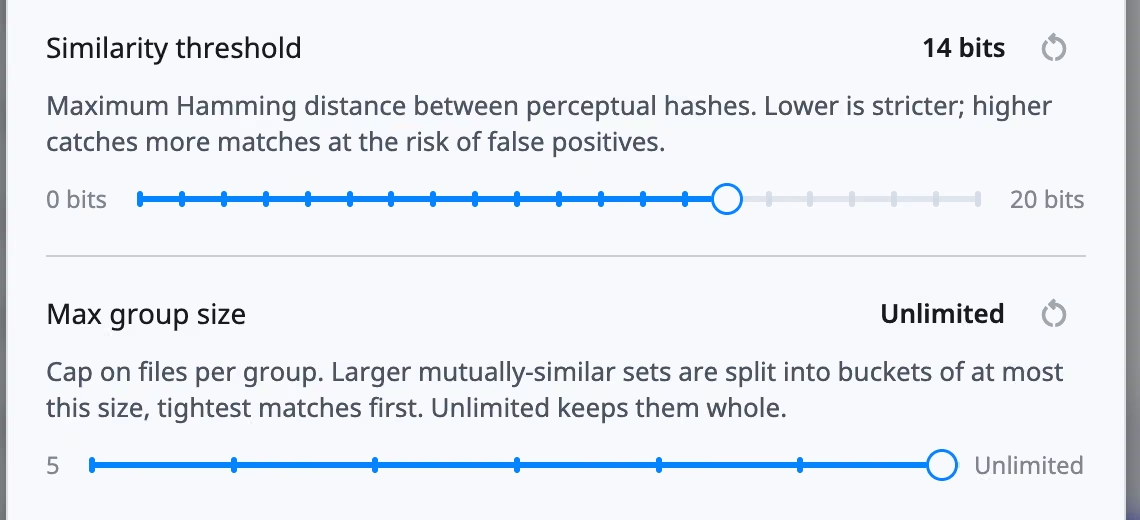
Scan parameters → Similarity threshold sets how many bits may differ before two images stop being candidates. It is measured in bits, from 0 to 20, and defaults to 14.
Maximum Hamming distance between perceptual hashes. Lower is stricter; higher catches more matches at the risk of false positives.
Not by chaining.
DuoBolt grows a group only while every pair inside it stays within the threshold — not merely each new member against one existing one. Without that rule, a chain of slightly-similar photos would slide into one enormous group where the first and last images have nothing to do with each other.
So any two photos in a group are within the threshold of each other, not just of some representative.
Max group size caps how large a group may get. Larger mutually-similar sets are split into buckets, tightest matches first. It defaults to Unlimited.
A distance below the threshold makes two photos candidates. Several checks can still reject them:
Every group is labeled with one of two kinds, and the distinction is about what you would do with it.
Variants
One shot, stored more than once. A RAW and the JPEG exported from it, an iCloud HEIC/JPG pair, a downscaled export beside its original.
The useful action is usually: keep the best copy, drop the rest.
Look-alikes
Different frames that resemble each other. Burst frames, retakes of the same setup, a photo re-saved after an edit.
The useful action is usually: choose which frame you like, which is your call.
A group is Variants when all its files are image formats, they agree on capture time or share a filename stem in one folder or produce identical fingerprints, and they differ in format or dimensions — that last part is what makes it “the same shot stored differently” rather than “the same shot twice”. Everything else is Look-alikes.
Disagreeing capture times are authoritative: if the EXIF says these were taken at different moments, the group is Look-alikes whatever else matches.
Every group carries how tightly it matched, based on the largest distance between any two of its members. There are five bands:
| Band | What it means |
|---|---|
| Identical | Same fingerprint, and byte-identical files |
| Virtually identical | Same fingerprint, different bytes — a re-encode |
| Very similar | 1 to 4 bits apart |
| Similar | 5 to 8 bits apart |
| Loosely similar | More than 8 bits apart |
The Tightness range control in the results filters by these bands. It is a range, not a floor: you can look at only the loose groups, which is a good way to audit whether your threshold is set too high.
Next
Reading the results — the grid, the filters, and how to select across groups.
Then
AI Curation ranks a group and names what it measured.